微信小程序
微信小程序的通知现在由模板通知变更到了订阅消息:
长这样:
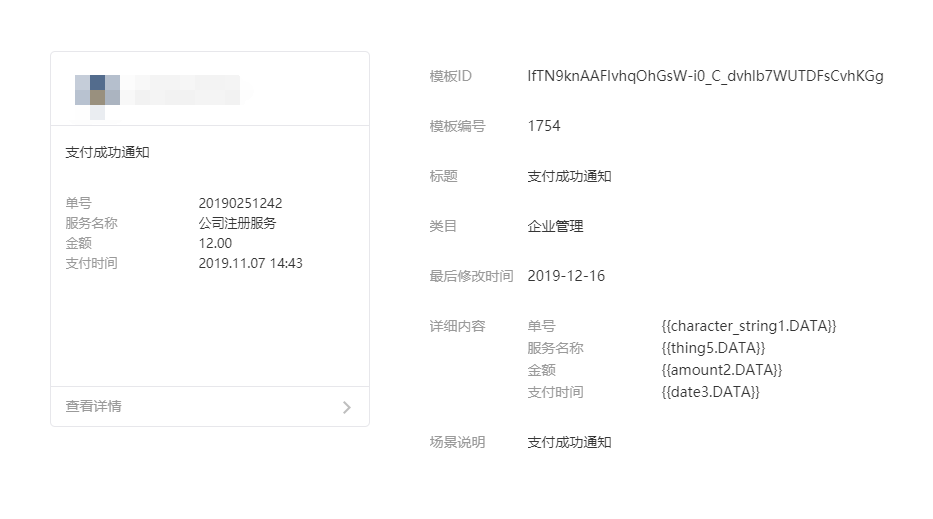
发送订阅消息的流程是:
- 小程序端拿到
js_code - 服务端通过
js_code请求Open ID并存到数据库 - 请求
Access Token - 通过
Open ID、Access Token、模板ID给用户发送订阅消息
获取 Access Token 的方法:
protected $tokenUrl = 'https://api.weixin.qq.com/cgi-bin/token?grant_type=client_credential&';

public function getToken($appid, $secret)
{
    $tokenUrl = $this->tokenUrl . 'appid=' . $appid . '&secret=' . $secret;
    $token = Cache::remember('applet:access_token'.$appid, 100, function () use ($tokenUrl) {
        $result = json_decode($this->client->get($tokenUrl)->getBody()->getContents(), true);
        if (isset($result['access_token'])) {
            return $result['access_token'];
        }
        throw new \Exception(json_encode($result));
    });

    return $token;
}
这样也行:
$url = 'https://api.weixin.qq.com/cgi-bin/token?grant_type=client_credential&appid=' .
    $appID . '&secret=' . $appSecret;
$html = file_get_contents($url);
$output = json_decode($html, true);
return $output['access_token'];
通过 js_code 获取 Open ID 的方法:
$url = "https://api.weixin.qq.com/sns/jscode2session?appid={$appID}&secret={$appSecret}&js_code={$jsCode}
        &grant_type=authorization_code";
$html = file_get_contents($url);
$output = json_decode($html, true);
$openID = $output['openid'];
实现的 Job 方法:
namespace App\Jobs;

use App\Services\AppletCodeService;
use GuzzleHttp\Client;
use GuzzleHttp\Exception\GuzzleException;
use GuzzleHttp\Psr7\Request;
use Illuminate\Bus\Queueable;
use Illuminate\Contracts\Queue\ShouldQueue;
use Illuminate\Foundation\Bus\Dispatchable;
use Illuminate\Queue\InteractsWithQueue;
use Illuminate\Queue\SerializesModels;
use Illuminate\Support\Facades\App;

class SendSubscribeMsg implements ShouldQueue
{
    use Dispatchable, InteractsWithQueue, Queueable, SerializesModels;

    protected $appID;
    protected $appSecret;
    protected $accessToken;

    protected $url;
    protected $data;
    protected $openID;
    protected $templateID;

    /**
     * Create a new job instance.
     *
     * @param $data array 数据
     * @param $openID string 微信ID
     * @param $templateID string 消息模板ID
     * @param $url string 跳转地址
     */
    public function __construct($data, $openID, $templateID, $url)
    {
        $this->data = $data;
        $this->openID = $openID;
        $this->templateID = $templateID;
        $this->url = $url;
        $this->appID = config('ebooking-app.AppID');
        $this->appSecret = config('ebooking-app.AppSecret');

        // 本地环境时使用测试用的 AppID 和 AppSecret
        if (App::environment('local')) {
            $this->appID = config('ebooking-app.AppID-test');
            $this->appSecret = config('ebooking-app.AppSecret-test');
        }

        $this->accessToken = app(AppletCodeService::class)->getToken($this->appID, $this->appSecret);
    }

    /**
     * Execute the job.
     *
     * @return void
     * @throws GuzzleException
     */
    public function handle()
    {
        $url = 'https://api.weixin.qq.com/cgi-bin/message/subscribe/send?access_token=' . $this->accessToken;

        $params['touser'] = $this->openID;
        $params['template_id'] = $this->templateID;
        $params['page'] = $this->url;
        $params['data'] = $this->data;

        $client = new Client();
        $client->send(new Request('POST', $url, [], json_encode($params)));
    }
}
发送
dispath(new SandSubscribeMsg(
    [
        'thing1' => ['value' => '每日早起'],
        'time3' => ['value' => '2099/12/30 20:00'],
        'name4' => ['value' => '小明'],
        'thing2' => ['value' => '有虫吃'],
    ],  // 数据
    'AAAAAAAAAA', // OPEN_ID
    'BBBBBBBBBB', // 模板ID
    'CCCCCCCCCC'  // URL 跳转链接
));
注意
还需要用户点击消息授权才行,一次最多同意三个:
    wx.requestSubscribeMessage({
        tmplIds: [
            'TGZzqLAviHZjCKszjaC80qqWnki50rUWuiZnGGCUYRw',
            'Xwc_GbmFjrlM1recJBJgN7pY5jKHreUZTc51ATEGZ6I',
            '75-X17FB815ChZUE50iI0s6rX-5nrvptPZV6MsKtzbY'
        ],
        success(res) {
            console.log('已授权接收订阅消息')
        }
    })
用户同意了才能发送成功
这个方法在 2019-12 测试是没问题的,考虑到微信可能会经常变更设计,所以下一次不一定有用,还是以官方文档为准